01 problem
You sign in once. Twenty minutes later the agent stops mid-task and asks for a password. Not because the tool broke — because the OAuth token behind it expired. MCP sessions sit on top of access tokens that expire on a schedule (often within the hour), refresh flows that fail silently, and session IDs a server is free to invalidate at any moment. Every MCP client inherits this, so every MCP-based product inherits it too. The standard fix today is a human retyping credentials.
evermcp is a small local process that takes that job away from the human.
02 how it works
One process sits between your clients and your servers. It owns every credential and every upstream session, so it can fix what the client never sees.
| what happens | proven by |
|---|---|
| A 30-second sweep rotates every OAuth token at 75% of its lifetime — before anything expires. | test 07 · sweep refreshes at 75% of TTL, before the token expires |
| A 401 triggers exactly one refresh and one retry. If it still fails, the error reaches you. | test 05 · 401 on a still-valid-looking token triggers one refresh and one retry |
| A 404 — the server invalidated the session — replays the original initialize and sends the call once more. | test 08 · upstream 404 resurrects the session and replays the call once |
| Refresh is single-flight and shared: every client goes through one process, so parallel sessions can't invalidate each other's refresh tokens. | test 06 · parallel requests after expiry share a single refresh |
Tool calls that fail server-side — 5xx, timeouts — are surfaced and never replayed; a retried non-idempotent call could do real damage (test 10). Servers that use plain API keys instead of OAuth are supported too: the key is stored encrypted and sent verbatim, nothing to rotate.
03 proof
Run it yourself. This is the actual output, unedited:
$ npm test
# tests 19
# pass 19
# fail 0

$ npm run demo:expiry
2023-11-14 22:13  first call                         ok  refreshes=0 reinits=0
2023-11-15 22:13  24h later, access token expired    ok  refreshes=1 reinits=0
2023-11-16 22:13  48h, upstream session also gone    ok  refreshes=2 reinits=1
2023-11-17 22:13  day 3                              ok  refreshes=3 reinits=1
2023-11-18 22:13  day 4                              ok  refreshes=4 reinits=1
2023-11-19 22:13  day 5                              ok  refreshes=5 reinits=1
2023-11-20 22:13  day 6                              ok  refreshes=6 reinits=1
2023-11-21 22:13  day 7                              ok  refreshes=7 reinits=1
2023-11-22 22:13  refresh token revoked upstream     error -32001: re-authentication required for demo: invalid_grant  refreshes=7 reinits=1

user prompts before the revocation: 0
The 2023 timestamps are the test clock's fixed epoch — the demo simulates a week in about a second. The provider on the right is a local fake that follows the OAuth and MCP specs, not a real server; real-provider testing is the top item under limits.
Each of the 19 tests is a behavior:
- 01discovery falls back to default endpoints when the server publishes no metadata
- 02full PKCE sign-in: register, authorize, exchange; wrong verifier and reused code are rejected
- 03session survives a forced 24h expiry with zero intervention
- 04survives a week of daily expiries, rotating the refresh token each time
- 05401 on a still-valid-looking token triggers one refresh and one retry
- 06parallel requests after expiry share a single refresh
- 07sweep refreshes at 75% of TTL, before the token expires
- 08upstream 404 resurrects the session and replays the call once
- 09revoked refresh token escalates to needs_reauth and stops hammering the server
- 10a 500 on a tool call is surfaced and never replayed
- 11vault encrypts per record and enforces version checks
- 12static api-key credentials are used verbatim and never refreshed
- 13a rejected static key surfaces 401 without retrying
- 14vault round-trips encrypted records through a file
- 15register keeps rotated tokens instead of reloading stale ones from servers.json
- 16dashboard is served; /api/state reports live status; refresh rotates the token
- 17kill switch blocks the data plane until resumed
- 18a stdio client survives two forced 24h expiries and a killed upstream session with zero intervention
- 19gateway keeps one stable client session across an upstream kill and enforces the perimeter
04 install
Three commands and one config line. The source isn't public yet, so this starts from having the repository on disk.
cd evermcp
npm install -g .
evermcp
evermcp prints its data-plane address and a dashboard URL with the admin token in the fragment. Everything lives in ~/.evermcp/.
Open the dashboard URL. Press a, enter an alias and the server's MCP URL, and sign in at the provider in the browser window that opens. That is the last time you type that password.
// Claude Desktop / Cursor — the whole configuration:
{ "mcpServers": { "linear": { "command": "evermcp-stdio", "args": ["linear"] } } }curl -X POST http://127.0.0.1:7421/mcp/linear \
-H "Authorization: Bearer $(cat ~/.evermcp/token)" \
-H 'content-type: application/json' \
-d '{"jsonrpc":"2.0","id":1,"method":"initialize","params":{}}'API-key servers skip the sign-in: pick api key in the form, name the header, paste the value.
05 the dashboard
No build step, no dependencies — one HTML file served by the daemon itself.
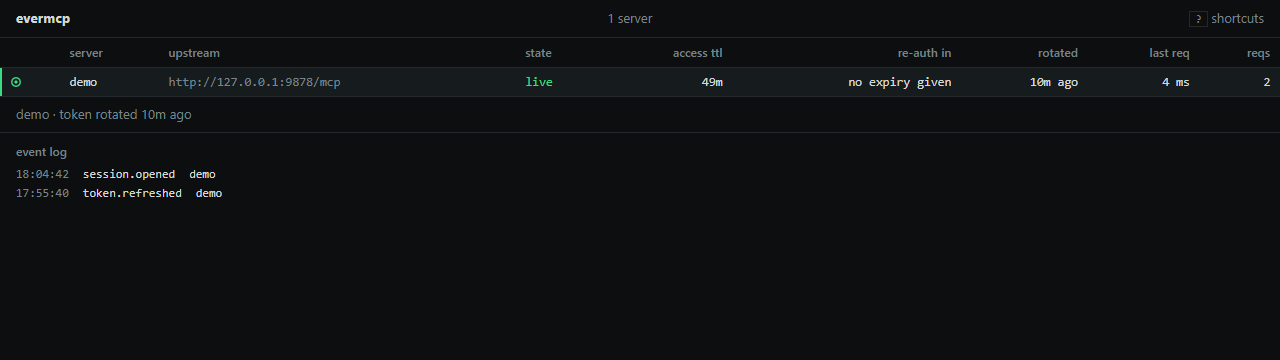
Each row shows a state glyph, the access-token countdown, the re-auth countdown, when the token last rotated, and the last request's latency. The glyphs are the same ones the tests use:
| state | meaning | |
|---|---|---|
live | token fresh, nothing to do | |
refresh due | rotation imminent, handled automatically | |
re-auth needed | provider revoked the grant — one login, on purpose | |
disabled | you pressed x; the data plane returns 503 until you press it again |
| key | action |
|---|---|
| j k | select server |
| a | add a server |
| l | sign in again |
| r | rotate token now |
| x | disable / resume |
| ? | help |
Before you've signed in to anything, the dashboard says: “No servers yet. Press a, enter an alias and the server's MCP URL, then sign in at the provider. The server appears here and stays signed in.” That sentence was written before this page was.
06 limits
- If a provider revokes the refresh token, no gateway can recover silently — not this one, not any. The server flips to
re-auth needed, clients get error-32001, and you press l. One login, loud and on purpose. - The vault key is a file (
~/.evermcp/vault.key), not the OS keychain. Windows doesn't enforce file modes, so keep that folder out of shared locations. Keychain support is on the list. - No streaming GET yet: servers that push requests to the client over the GET channel aren't supported.
- Tested against a spec-following fake provider, not yet against real ones. That gap is the current top priority, and it's the reason the demo output above names its provider.
- Local daemon only. There is no hosted mode, and that is deliberate until the threat model earns it.
07 faq
Why a gateway instead of fixing each client?
Because the fix belongs in one place that all clients already talk to. Getting every MCP client author to implement the same refresh-and-resurrect logic is a coordination problem; a local process with a config line is not.
What happens if the daemon dies?
Clients get connection errors until it restarts — the same experience as a network blip. On restart it reloads encrypted tokens from disk and re-establishes sessions. No re-login. Verified manually across a daemon restart.
Where do the tokens live?
~/.evermcp/vault.json, AES-256-GCM per record, record ID bound as authenticated data, key in a separate file. The dashboard and API never return token values — only expiry times.
Does it replay my tool calls?
Only when it's provably safe: a 401 or 404 means the server rejected the call before processing it. Timeouts and 5xx are never replayed, because a retried non-idempotent call could do real damage.
What does it see?
All traffic between your clients and the servers you registered. It binds to 127.0.0.1, rejects requests carrying an Origin header (DNS-rebinding guard), and both the data plane and the dashboard require tokens.
What if two clients refresh at once?
They don't. One process owns every credential, and a per-credential mutex makes refresh single-flight. That race is exactly what breaks multi-session MCP setups today.